Roofing Website Design: How to Build One That Converts
You opened the site on your phone between jobs and the first thing on screen was a stock sunset, not your number. A homeowner with a wet ceiling is doing the same check right now. If the page does not say you cover their suburb, and how to reach you, they call the next name. Roofing website design works when it follows the research they do before they ring: repair or replacement, consent, proof, and what happens to the details they type into a form. Those questions are the path to the enquiry, not fine print you hide in a footer.
Table of Contents
- The Pages Every Roofing Website Needs
- How to Lay Out Your Homepage Above the Fold
- Calls to Action That Turn Visitors Into Enquiries
- Trust Signals Homeowners Check Before Calling
- Service Pages That Answer Hard Questions
- Speed, Accessibility and Go-Live Checks
The Pages Every Roofing Website Needs
A roofing site needs seven core pages. In the first months, three of them do most of the work: the homepage, the main service pages, and the suburb pages. Each page should answer one decision the visitor is trying to make.
| Page | Job it does | Must include |
|---|---|---|
| Homepage | Routes visitors to the right service and area | Service areas, tap-to-call number, top three services |
| Repair service page | Answers what a leak fix involves and costs | Typical repair scope, call-out process, photo examples |
| Re-roof service page | Explains replacement options and timelines | Material options, warranty terms, whether building consent applies |
| Area page (per city or suburb) | Confirms you serve their street | Suburbs covered, local project photos, phone number |
| Project gallery | Shows real work | Captioned photos with roof type, job size and location |
| About and licensing page | Builds trust in the team | Licence or registration details, named team, insurance |
| Contact page | Captures buyers ready to act | Phone, short form, stated response time, a line on where submitted details go |
The homepage has one job: send people to the right service and area within seconds. Keep repairs and re-roofs on separate pages. A homeowner with a leak wants scope, timing and a rough price for a fix. One pricing a replacement wants materials, warranties and whether the job needs building consent. Mixing those questions makes both pages vague.
Area pages matter more in New Zealand than most owners expect. Connection quality varies widely across regions, and a visitor on a weak rural connection often needs a phone number and a list of towns more than a long form. Name every suburb you cover, show the number, and keep the page light enough to load on a slow connection.
Two pages do quiet conversion work. On the contact page, state who sees the details a visitor types in and how fast you reply; homeowners deciding whether to hand over their number check that line first. On the About page, name the people who will arrive at the house and show licence and insurance details, because that is the proof a careful visitor looks for before calling.
Build in this order: homepage, one repair page, one re-roof page, and the contact page. Add the gallery and About page once photos are captioned. If search is part of the brief, AI-driven SEO for roofing websites is a useful companion on how those pages get found.
How to Lay Out Your Homepage Above the Fold
The first screen decides most visits. In the 2023 Census, 93.5% of New Zealand households reported cellphone access, or 1,522,950 dwellings, according to the Stats NZ census release. Most homeowners will see the homepage on a phone, often on mobile data, often in a hurry.
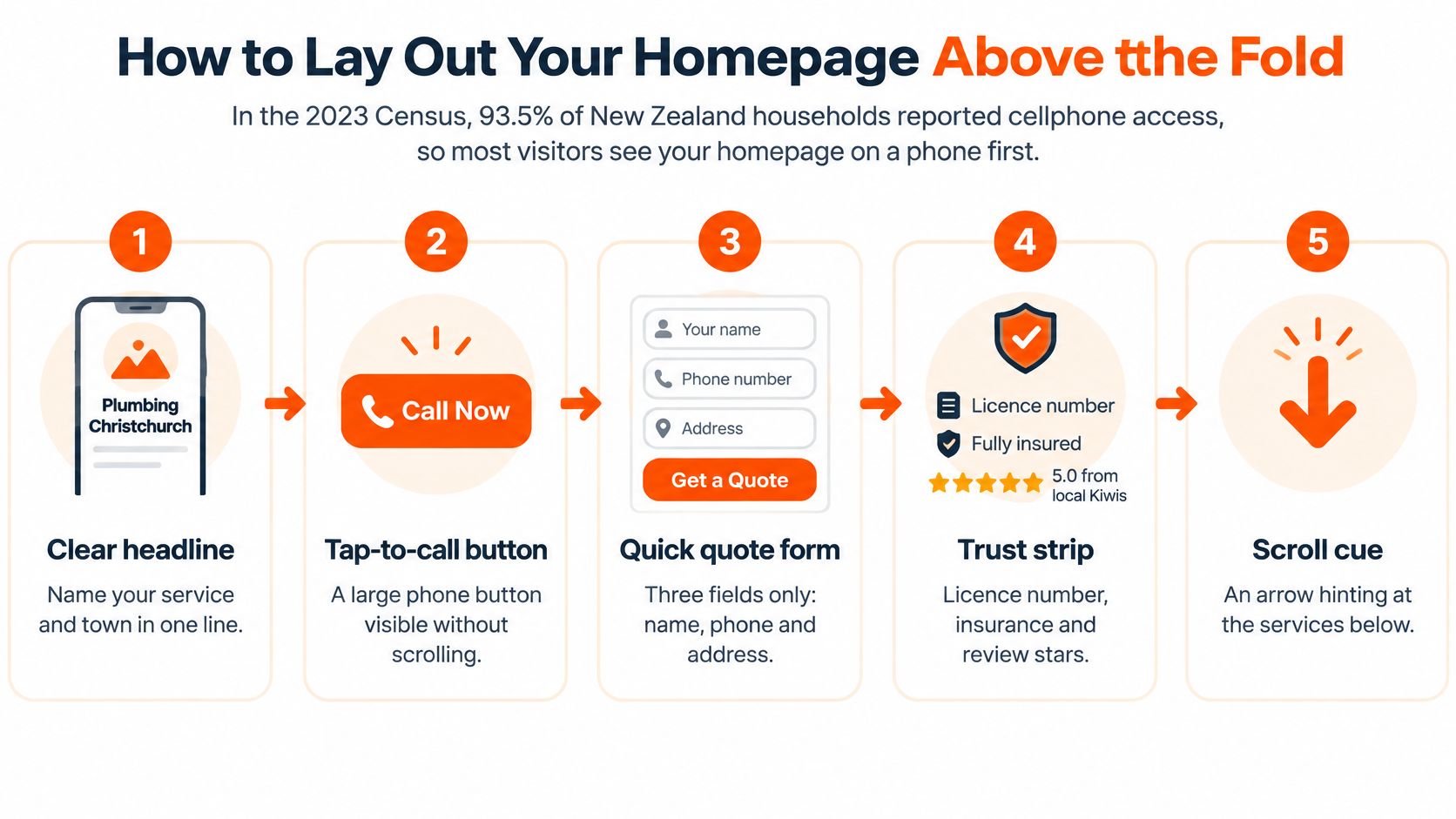
Build that first screen in this order.
- Put the service and the area in the headline, such as roof repairs across Hamilton and Cambridge. One line tells them they are in the right place.
- Add a tap-to-call button with the number visible. An urgent leak needs one tap, not a hunt through the menu.
- Add one sentence that names the problem solved, such as stopping ceiling stains after a storm. Specific beats clever.
- Add a trust strip with licence details, years trading, and a review score with the review count. A score without a count looks thin.
- Show three service tiles that link to the service pages. A list of twelve services makes them scroll past the ones that matter.
- Use a real photo of recent work as the hero. A stock sky, or a hero video, pushes the call button down and slows the page.
- Place the quote entry just below that first screen for people who prefer a form. The landing page best practices we use for roofing ads follow the same rule: the ask sits where the thumb already is.
Practical rule: If the number and the service area are not visible without scrolling, the first screen is not finished.
Open the page on a mid-range phone using mobile data. Check whether the number and the towns are on screen before you scroll. If you have to pinch or wait, fix that before you add anything else.
Calls to Action That Turn Visitors Into Enquiries
Every page needs one primary action and one fallback. A visitor with a leaking ceiling and a visitor comparing re-roof prices are not ready for the same next step.

| Action | Best for | Effort for the visitor | Watch out for |
|---|---|---|---|
| Tap-to-call button | Urgent leaks, storm damage, rural visitors | Low: one tap | Number must be tappable on every page and in the header |
| Short quote form | Planned re-roofs and comparison shoppers | Low to medium | Each extra field lowers completions |
| Photo upload with form | Repairs where damage is visible | Medium: needs phone photos | Say which photos help, such as the roof area, gutter line or interior stain |
| Book a free inspection | High-value replacements | Medium: must pick a time | Only promise free inspections if they really are free |
| Request a callback | Visitors browsing after hours | Low | Show the callback window, or the visitor will feel ignored |
Wording, placement and form length
“Book a free roof inspection” sets a clearer expectation than “Submit”. “Call today for a same-week inspection” only works if someone answers that day. Keep the phone button in the header and sticky on mobile. Put the quote form after the problem and the proof, not above them. People who have not seen the work yet treat an early form as a trap.
Name, phone, suburb and roof issue is enough to start a job. Photos stay optional. New Zealand Government web guidance says personal information should be collected only when necessary for a legitimate purpose, and that visitors should be told what is collected, why, how it will be used, and how they can access or correct it. Put a short privacy line beside the form, with a link to the privacy statement. That matters more when the form feeds call tracking, a CRM, or a quoting tool, because more people then handle the details.
If the team cannot respond inside the window the page promises, a callback form sets up a failed promise. State the true response time. Pairing the button with a clear next step is the same idea behind practical lead generation marketing: the action has to match what the crew can realistically do that week.
Trust Signals Homeowners Check Before Calling
Before they call, a homeowner runs a simple test. Can I check this roofer exists, is licensed, and will stand behind the work? If the site fails that test, the quote never starts.
Put this proof where they can find it without digging.
- Licence or registration: Show the numbers in the footer and on the About page, plus Licensed Building Practitioner (LBP) status where a licensed practitioner does the work.
- Warranty: State the length and what it covers on the service page, not in a footnote.
- Reviews: Show the count and recent comments beside the stars. A 5.0 from six reviews reads weaker than 4.8 from 200. TheBestReputation on customer reviews explains why recent, specific testimonials carry more weight than a bare score.
- Named people: Use real photos of the team, not a stock crew.
- Captioned jobs: Suburb, roof type and job size on every photo.
- Insurance: One plain sentence on what cover you hold.
- Years trading: State them plainly. No slogans.
How to phrase the claim
Skip “fully compliant” and “best roofer in town” unless you can show the evidence on the same page. New Zealand’s Building Code is a statutory, performance-based framework with a minimum required standard and eight key areas, from protection through to energy efficiency, as Consumer NZ describes it. A word like weathertight should say what that means for this job, and that project-specific compliance, consent and any producer statement are confirmed with the contractor or the council.
Count how many of the seven items the current site shows. Fix licence details and warranty terms first. Stars and slogans can wait.
Service Pages That Answer Hard Questions
Service pages are where a homeowner decides whether to put you on the quote list. Give the short answer first, then expandable detail for the reader who wants it. A wall of specifications loses the person who only needed the next step.
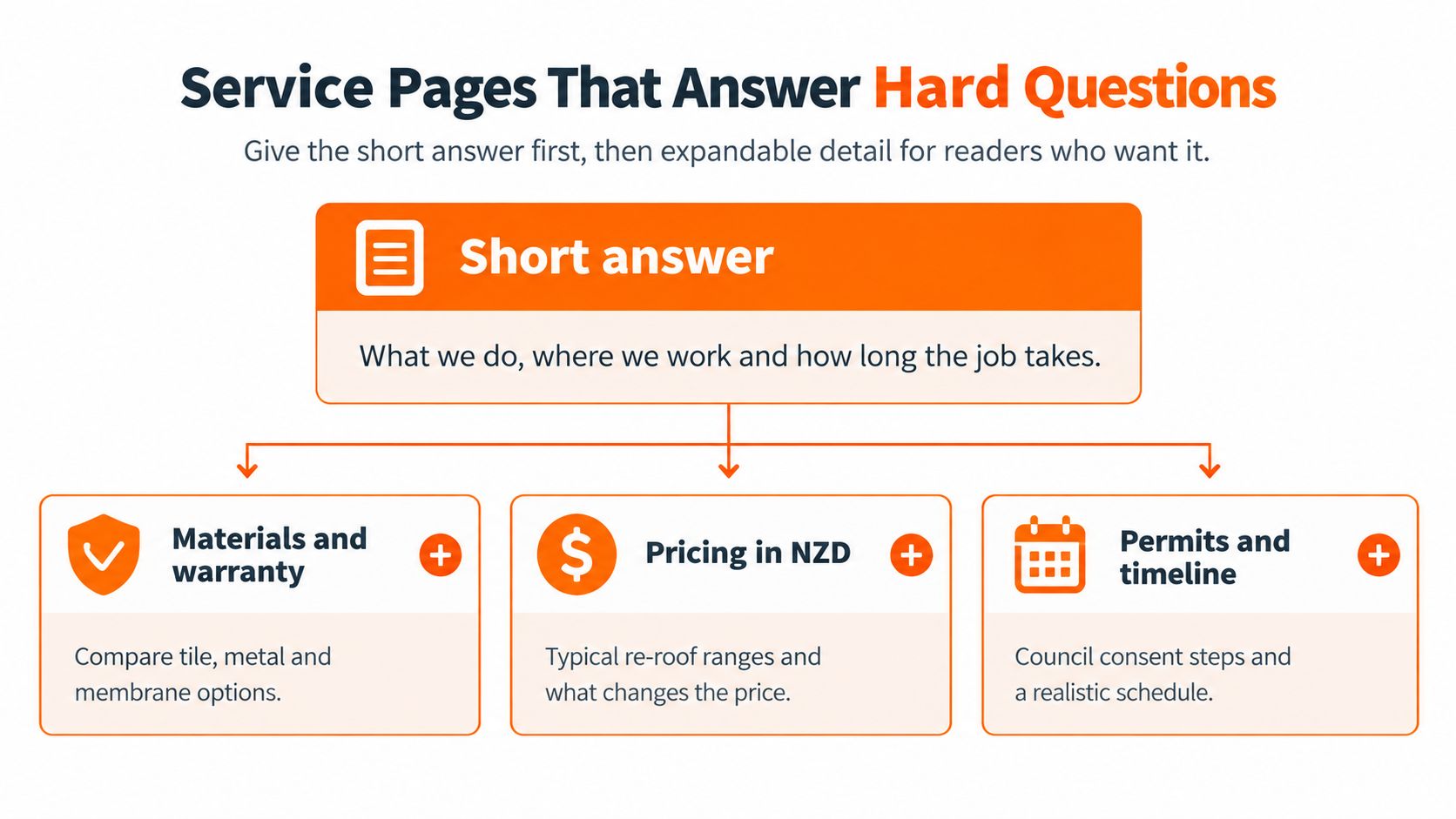
What each service must answer
A repair page should say what usually causes the leak, what the call-out includes, and whether you send a photo report. A re-roof page should name material options, expected life next to the warranty terms, and what the quote includes and leaves out. Metal long-run and tile pages should cover fixings, roof pitch and weight. Weight is the point most generic pages skip, and it is the point that changes consent.
The consent path most sites skip
Do not publish a generic consent page that says “like-for-like is fine”. MBIE guidance on checking consents treats low-risk work as able to be exempt, while all building work must still comply with the Building Code, and councils should be consulted for the specific project. Replacing an old profiled-metal roof with a comparable component is an exempt example. Replacing corrugated iron with heavier concrete tiles is likely to need consent, because the added load can affect the structure.
| Scenario | Typical position | What the page must say |
|---|---|---|
| Replace old profiled-metal roof with comparable component | Exempt (MBIE example) | Confirm the component is like-for-like and that council confirms |
| Replace corrugated iron with heavier concrete tiles | Consent likely (MBIE example) | Explain the added load and that a structural check is needed |
| Change in roof pitch, skylights or framing | Consent likely where the structure changes | Name these factors and send the project for council review |
| Roof that failed early or prematurely | Assessed case by case with council | Ask the contractor and council to assess the specific case |
Walk the visitor through roof age, existing and proposed materials, weight change, pitch, skylights and any structural alteration. Add a council-check step. Say plainly that an online form cannot decide compliance. Then give them questions to ask the contractor: materials named, scope boundaries, exclusions, process stages, warranty, and who confirms consent.
Promising “no consent” to reduce friction costs trust. Saying what is uncertain, and who confirms it, is what gets the inspection booked.
Speed, Accessibility and Go-Live Checks
A fast page that nobody can use, or a pretty page that loads after they have hung up, both fail the same job. Set the landing-page template against Google’s “good” Core Web Vitals in field data, then watch the enquiries beside those scores. NZ Government web standards guidance is a practical benchmark for that build, even though the government mandate itself does not automatically cover a private roofing business.
| Metric | What it measures | Target | Why it matters for roofers |
|---|---|---|---|
| Largest Contentful Paint (LCP) | How long the main image or heading takes to appear | 2.5 seconds or less | A slow hero delays the phone button on cellular connections |
| Interaction to Next Paint (INP) | Delay between a tap and the page responding | 200 milliseconds or less | Taps on the phone number or form must feel instant |
| Cumulative Layout Shift (CLS) | How much the page jumps while loading | 0.1 or less | Stops visitors tapping the wrong button |
| Qualified calls and completed forms | Real enquiries from the site | Track weekly | A passing speed score does not prove the site generates leads |
A slow hero hides the call button. A page that jumps makes the tap land on the wrong control. A laggy form loses people halfway through the suburb field.
Build sequence
- Serve WebP or AVIF project photos sized for a phone, not the camera original.
- Reserve fixed width and height on images and testimonial blocks so nothing jumps.
- Defer chat widgets and heat-map scripts until after the first screen.
- Test Auckland, Wellington, Christchurch and a regional page on a throttled mobile connection.
- Tab to the quote button and the phone link with the keyboard alone.
- Check descriptive alt text, visible form labels, and text that stays readable at 400% zoom without sideways scrolling.
Ten-minute go-live list
Answer each item yes or no.
- Phone number tappable on every page and in the header.
- One primary action and one fallback on each page.
- Top service and suburb in the homepage headline.
- Area pages list suburbs and a phone number.
- Re-roof pages carry the consent path and the disclaimer.
- Privacy line beside the form, with a link.
- Form asks only for what starts a job.
- Warranty terms sit on the service pages.
- Photos are real and captioned.
- The key template meets the three speed targets in the table.
- Keyboard and 400% checks are done.
Fix phone and form items first, then speed and accessibility, then deeper content. Each week, track phone-link taps, call duration where you have it, form completions and booked inspections next to those speed scores. A green speed report with no calls is not a win.
Before you switch the domain on a rebuild, run DNS checks for website migrations from SiteAlive so the new site is actually what visitors hit. Oversized before-and-after photos, a hero video sitting on the quote button, and a map embed on every page are the usual reasons a New Zealand roofing page misses the targets.
We publish a roofing advertising guide that ranks the channels candidly, and we keep a free intro call, an ROI calculator, sample leads, a roofing ads report, case studies, client reviews, website transformations, and short resources on roofing marketing topics for owners who want to see how the pages perform once the ads are live.
Bluelight designs roofing websites and landing pages so homeowners can call or request a quote without hunting for the number, the suburb or the proof. If you want the first screen, the service pages and the tracking built around the jobs you really want, start with a look at how we work. Visit Bluelight and book the intro call when you are ready to put the site to work.
Related service Google Ads for Roofers