Performance Max for Roofers: What Works in 2026
Your phone rings at 7.15 on a Monday. A homeowner wants a price for a full re-roof before the ute is even loaded. Two hours later a form arrives from three suburbs past your travel limit, asking if someone can “just pop over and look”. Both came from the same Google Ads campaign. One is a job you can quote. The other is a price shopper who will never book.
That split is the whole problem Performance Max creates for a roofing company. The campaign does not know a good enquiry from a bad one until you teach it. Count every click, every short call and every half-filled form, and it will find more of those. Count conversations that turn into inspections and accepted quotes, and it will hunt for those instead.
The setup below is what makes that teaching stick: where the ads can show, which services get their own message, which calls and forms count, and how a won job gets fed back so the bidding favours paid work.
Table of Contents
- What Performance Max Means for Your Roofing Business
- How Performance Max Chooses Where Your Ads Appear
- Where Performance Max Helps and Where It Falls Short
- Asset Groups and Audiences That Attract Roof Jobs
- Choosing the Calls, Forms and Quotes That Count
- Setting Budget, Bidding and Service Area
- Feeding Won Jobs Back Into Performance Max
- Start a Pilot Campaign and Review It Monthly
What Performance Max Means for Your Roofing Business
Performance Max is a single Google Ads campaign that runs across Search, Maps, YouTube, Display, Discover and Gmail. Google’s system decides where each ad appears. You do not build a separate campaign for each of those channels.
The old way is one crew per street, each with its own schedule and its own job sheet. Performance Max is one site supervisor. That supervisor sends whichever crew is free toward the job most likely to close, using the goal, the budget and the photos you handed over at the start of the day.
You still choose the parts that decide whether the work is worth taking.
- The goal: calls and completed quote forms, not page views.
- The budget: a daily amount sized to the inspections the calendar can take.
- The service area: the suburbs your crews will drive to.
- The ad assets: headlines, images, video and the logo.
- The audience signals: clues about who has searched or bought before.
You do not choose the exact placement of each ad, or the exact search term behind each click. Reporting therefore sits at channel and campaign level. You can see that Maps produced calls and YouTube produced views. You cannot pull a full keyword list the way a standard Search campaign allows.
A quote form that never reaches the person who books jobs teaches the campaign the wrong lesson. If Google Workspace forwarding drops those emails into the wrong inbox, troubleshoot Workspace forwarding issues before you raise spend, so the form and the phone land with the same person.
If you want people searching for roofing now and people still deciding who to call next week, Performance Max can suit. If every enquiry must come from one exact search term, keep a Search campaign.
Write down the one outcome you would pay for this month. If that outcome is “someone typed our exact phrase”, stay on Search. If it is “a homeowner in our area asked for a quote we can price”, this campaign type is the one to test.
How Performance Max Chooses Where Your Ads Appear
You set a goal, you supply assets and audience signals, and Google’s system tests placements, then reports results by channel. Google’s description of Performance Max calls it one campaign that uses automation to select placements and optimise toward conversion goals, instead of a separate campaign for each channel. That is a shift from manually segmented campaign management toward machine-learning-led allocation of budget and creative assets.
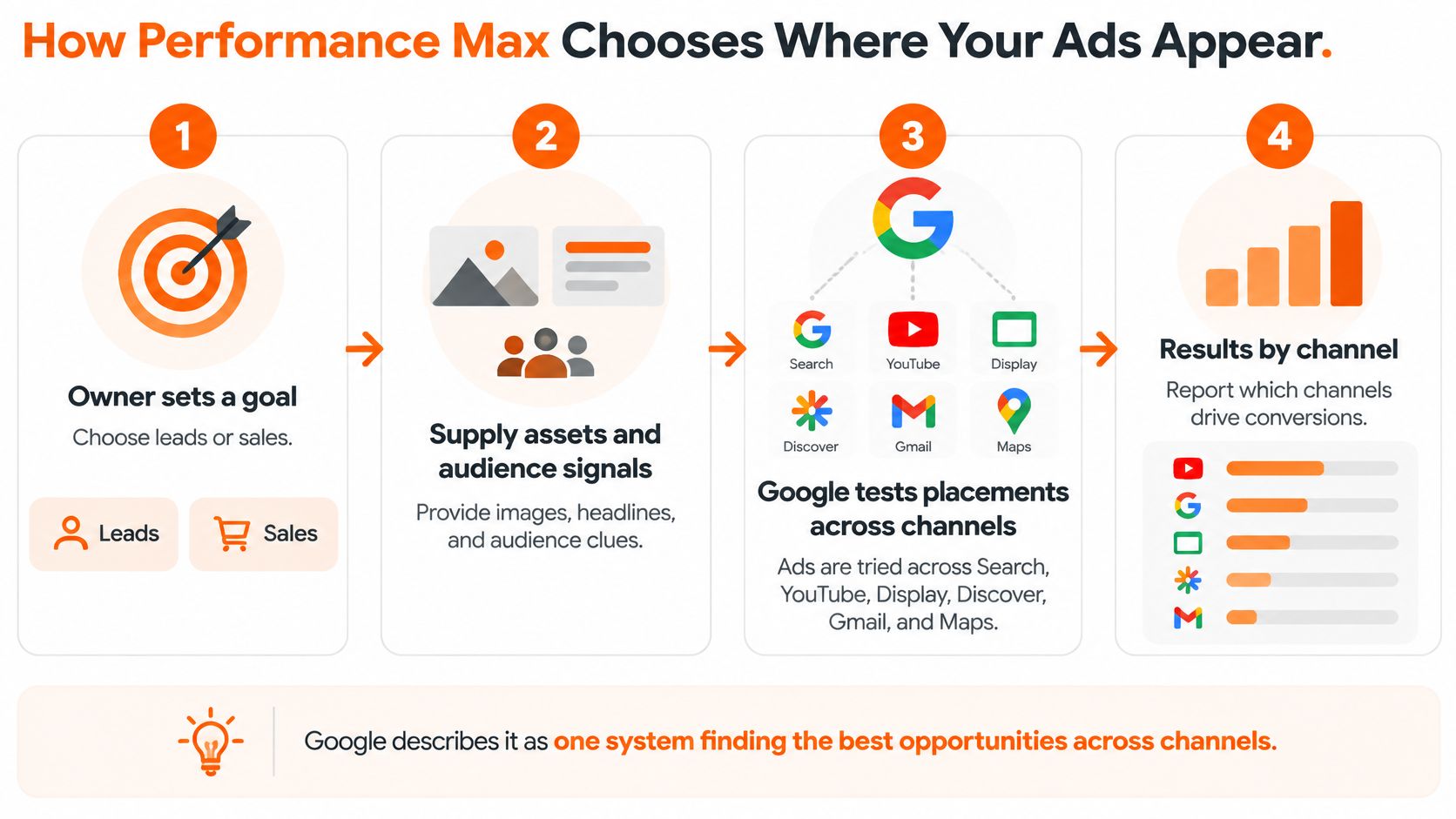
The same materials give a benchmark example of a 27% increase in sales at a 2x return on ad spend. Treat that as a promotional aggregate example, not a promised result for a New Zealand roofing job. What transfers is the sequence, not the percentage. For a roofer, the system can only optimise toward calls, quote forms and qualified enquiries if those are the conversions you record.
What each channel usually brings
| Channel | What the Person Is Doing | What It Usually Brings a Roofer |
|---|---|---|
| Search | Typing a repair or replacement query | Strongest source of ready-to-quote enquiries |
| Maps | Looking up roofers near them | Calls and directions from local searchers |
| YouTube | Watching videos, often on a phone | Brand recall, slower enquiries |
| Display | Browsing sites and apps | Awareness with very few direct calls |
| Discover | Scrolling a feed of topics | Early research, enquiries days later |
| Gmail | Checking the promotions tab | Occasional research enquiries |
Search is where someone is already naming the problem, a leak, a replacement, a gutter that has pulled away. That is the strongest path to a quote-ready call.
Maps puts the business in front of a nearby searcher who wants a number or directions. Those clicks often become phone calls the same day, which is why the service area has to be tight.
YouTube and Display mostly build recognition. A homeowner may watch a crew on a phone, or see a roof photo while reading the news, and call a week later. Expect very few direct calls from Display on its own.
Discover and Gmail catch people comparing options over several days. The enquiry, when it comes, is usually a research call rather than an emergency.
Channel reports show where conversions came from. They do not give a full keyword breakdown. The quality of the conversion signal, and the asset library you supply, shapes that mix more than a bid adjustment does. A thin set of generic photos pushes the system toward cheap awareness placements. Clear service photos and a goal built on real calls pull more of the budget toward Search and Maps.
Where Performance Max Helps and Where It Falls Short
A roofing company with accurate conversion tracking, a defined service area and clear priorities for the work it wants can get value from Performance Max. When tracking is weak or the service area is difficult to contain, automation can spend on enquiries that do not fit.
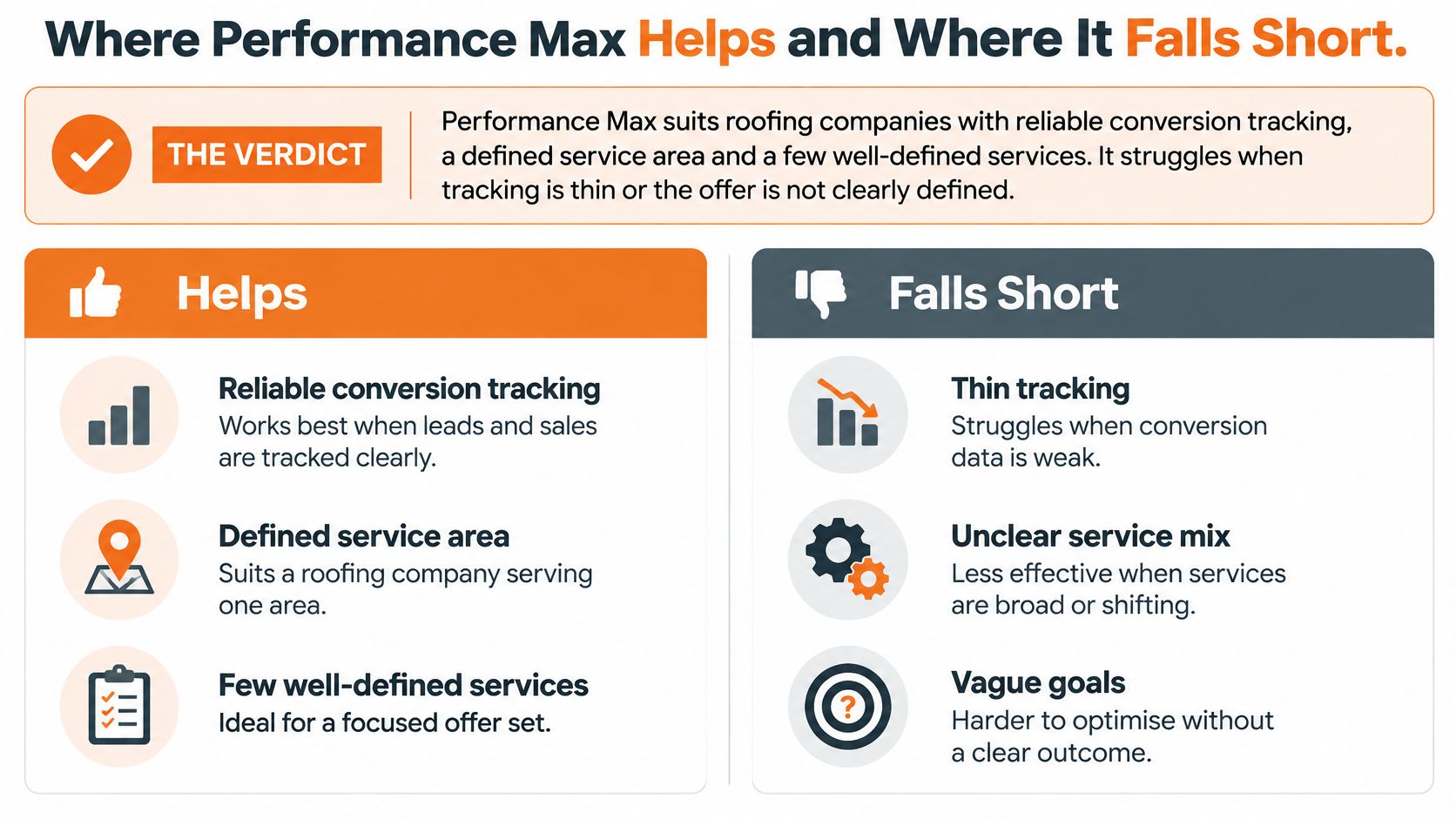
Google’s Performance Max product page for New Zealand and Australia describes campaigns that can span Search, Maps, YouTube, Display, Discover and Gmail, while Search campaigns focus on Search. That broader reach can help when a crew has spare capacity or demand changes with the weather. It also means less direct control over where ads appear and which interactions the system prioritises. The combined concreting, bricklaying and roofing-services industry is large, but it is local, and one crew cannot serve all of it.
Matched trade-offs
Reach against control. One campaign can reach people actively searching and people still researching. The trade-off is a less direct view of which channel, asset or audience led to a call.
Learning against leakage. Performance Max can use calls and forms to guide delivery, but it learns from the conversions you define. If every form counts equally, it may favour easy enquiries from price shoppers over calls that lead to quote-ready jobs. Location settings also need attention, or spend may reach suburbs your crew does not serve.
Discovery against a tight Search campaign. Performance Max can find demand beyond the searches you already target. Emergency leak repairs often depend on a specific search and a fast response, so a tightly managed Search campaign can give you more control over that work.
How to contain it
Set the boundaries before the campaign runs:
- Location exclusions: remove suburbs beyond the distance your crew will travel for a quote.
- A capacity rule: reduce or pause spend when the inspection calendar is full, rather than paying for enquiries you cannot attend.
- A split by job type: keep high-value emergency repairs in Search, and test replacement or maintenance with Performance Max.
Assess the campaign by qualified jobs you can schedule, not by impressions or a blended lead count. The conversion signal you provide determines whether the system seeks quote-ready work or more enquiries.
Asset Groups and Audiences That Attract Roof Jobs
A single asset group that mixes replacement, repairs and gutters shows one blended message. The system then favours whichever job converts most easily, often a small repair, and your replacement page never gets a fair test. Split by service so each message, audience clue and landing page match the work you want.
| Asset Group | Message to Lead With | Audience Signal to Add | Landing Page |
|---|---|---|---|
| Re-roofing and replacement | Full replacement quotes and what the price includes | Homeowners in the service area | Replacement page with quote form |
| Roof repairs and leaks | Leak inspections this week | Custom audience built from repair searches | Repair page with click-to-call button |
| Metal and long-run roofing | Metal roof options and durability | Homeowners in higher-value suburbs | Metal roofing page with quote form |
| Gutters and maintenance | Gutter clearing and roof checks | Homeowners in the service area | Gutters page with booking form |
| Commercial roofing | Membrane and flat roof work for property managers | Business owners and property managers | Commercial page with inspection request |
Re-roofing is not the same as a consented build
The Roofing Association of New Zealand submission to the Commerce Commission records that some reroofing work is exempt from a building consent under Schedule 1 of the Building Act, provided the work meets the Building Code’s performance requirements. Consent records are not a complete picture of who needs a roof. Name the service in the ad, re-roofing, replacement, repairs or maintenance, and qualify on the form or the call by roof type, property location, urgency and project scope.
Assets you can load this week
Headlines should name the service and the place, such as “Re-roofing in Hamilton” or “Leak inspections in Christchurch this week”. Use photos of finished roofs in your region, not stock images of a house that does not look like your streets. A short video of a crew on a roof, even a phone clip under a minute, gives YouTube and Display something specific to test. Add the logo and one clear call to action, call or request a quote.
Refresh the set about once a month. Swap a tired headline, add a new finished-job photo, and retire an image that has stopped earning clicks. Audience signals are starting points the system can widen, not strict filters. Add a custom audience built from repair and replacement searches where the account allows it, plus your own customer list if you have consent to use it.
Practical rule: every asset group must point to a page where a visitor can call or request a quote in one step.
A replacement click that lands on a generic home page wastes the signal. Match the final URL to the row in the table, and put the phone number and the form above the fold.
Choosing the Calls, Forms and Quotes That Count
The system optimises toward whatever you count. Count only the actions that predict a paid job, or you will buy more of the cheapest action on the list.
| Conversion Action | Counts as Conversion? | Relative Value | Why |
|---|---|---|---|
| Call lasting at least your set threshold | Yes | Medium | Shows a real conversation |
| Call under the threshold | No, track separately | None | Accidental taps and spam |
| Quote request form completed | Yes | Medium | Homeowner has asked for a price |
| Form started but not submitted | No | None | Too little intent to teach the system |
| Inspection booked | Yes | High | Closer to a paid job |
| Quote accepted (offline import) | Yes | High | Real revenue signal |
| Job completed and paid (offline import) | Yes | Highest | Strongest signal once margin is applied |
Calls
Google’s call-conversion documentation states that you can define a minimum call length, and calls that meet or pass that threshold count as conversions. Tracking covers calls from call-only ads, from call and location assets, and calls to a website number after an ad click. Website-call tracking uses a Google forwarding number and needs call reporting switched on.
A sensible starting threshold is about one minute. Listen to a week of recordings and move the line to where a real roofing conversation begins. Keep shorter calls in a separate column so you can spot spam without letting those taps train the bidding. Tell visitors that calls may be tracked and recorded, and get consent where New Zealand law and Google’s policies require it. Google requires clear information about data collection and consent where the law or its policies say so.
Forms and the stages after them
Count a completed quote request, not a form that was only opened. A started form has too little intent to teach anything useful. An inspection booked is closer to paid work, so give it a higher relative value than a form fill. Accepted quotes and completed, paid jobs arrive later. Import those from your customer system, and put the highest value on a job once you have applied a rough gross margin.
If every stage is worth the same, bidding will chase the form that is easiest to submit. A pipeline only forecasts well when each stage has a distinct worth. Teams that want to improve pipeline forecast accuracy treat an inspection differently from a raw enquiry, and the ad account should do the same.
Start with two or three conversions: qualified calls, completed quote forms, and booked inspections. Remove any action that counts a page view. You can add offline stages once the names in your customer system match the rows above.
Setting Budget, Bidding and Service Area
Set these before the campaign goes live. Each one stops a common way for spend to drift away from jobs you can do. Our notes on Google Ads for New Zealand roofers sit alongside this checklist if you want the wider account structure.
| Setting | Starting Choice | Why It Matters |
|---|---|---|
| Conversion goal | Qualified calls, quote forms and booked inspections | Gives bidding the signals that predict paid jobs |
| Location targeting | Service area only, present-or-interest option | Cuts clicks from suburbs crews do not cover |
| Location exclusions | Suburbs beyond the travel limit | Protects crew time |
| Daily budget | Sized from your pilot cost per qualified enquiry | Avoids enquiries the calendar cannot serve |
| Bidding strategy | Conversion-focused, then target cost per qualified enquiry | Moves to targets only after data is steady |
| Final URL | One landing page per service | Keeps the visitor on the service they searched |
| Learning period | Several weeks before judging results | Stops early decisions on thin data |
Leave page views and other secondary actions out of the goal. Use the present-or-interest location option for the suburbs you serve, then exclude the rest so a click from outside the travel limit does not spend the day’s budget.
If the calendar has three open inspection slots this week, buy roughly that many qualified enquiries, not the maximum the platform suggests. Take your recent cost per qualified enquiry, multiply by the slots you can attend, and set the daily budget from that figure. Start on a conversion-focused bid strategy. Move to a target cost per qualified enquiry only after volume has been steady for several weeks. Point each asset group at its own landing page so a metal-roof search does not land on a gutter form.
Feeding Won Jobs Back Into Performance Max
Most roofing enquiries become quotes days or weeks later. The paid job may only follow an inspection. The path runs enquiry, site inspection, quote, acceptance, deposit, then completed job. If the campaign only sees the first step, it will optimise toward the easiest form to fill.
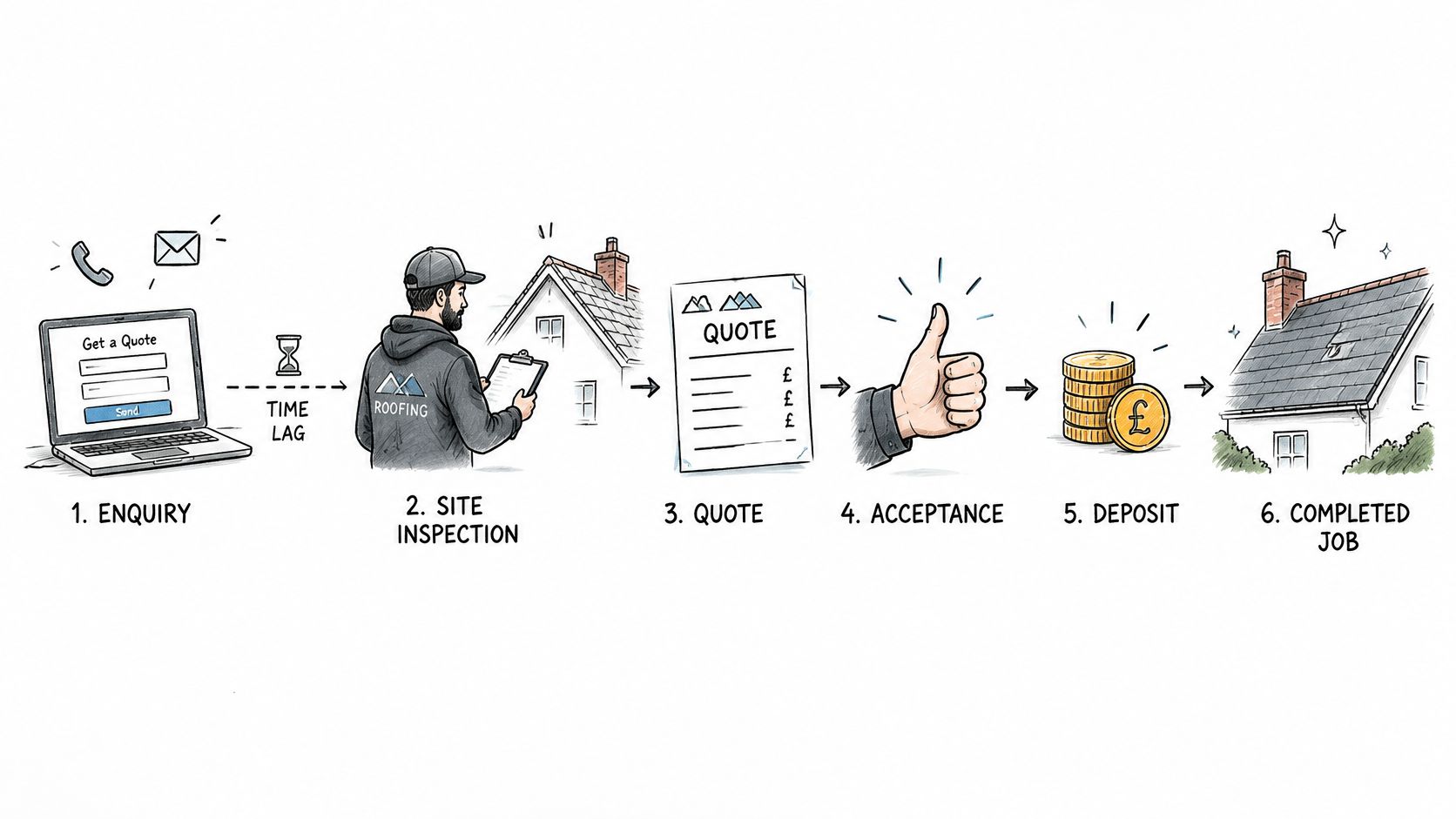
Google’s guidance for advertisers in New Zealand and Australia says advertisers are increasingly using enhanced conversions for leads and importing hashed first-party data so campaigns can learn from outcomes that happen long after the click. The same guidance notes that fragmented journeys, consent limits and missing click identifiers create attribution discrepancies, including apparent over-crediting of organic traffic. Treat the matched numbers as directional and compare trends, not single weeks. A plain account of how conversion tracking works helps the office see why a click and a paid invoice are not the same event.
What to send back
- Map each stage in your customer system to one conversion action, using the values you already set for calls, forms, inspections, accepted quotes and paid jobs.
- Assign a dollar value per stage from a rough gross margin for that job type. A paid re-roof is not worth the same as a gutter clean.
- Send hashed first-party customer data back to Google, with consent, so it can be matched to the original click where a click identifier still exists.
- Once a month, check whether qualified inspections and accepted quotes are rising, not just the raw lead count.
- Update the values when a service’s margin changes, so last year’s repair margin does not keep steering this year’s bids.
Missed calls and unqualified forms stay low or out of the goal. Qualified inspections, accepted quotes and margin-adjusted jobs are what you upload.
A higher cost per raw enquiry can beat a cheaper one. If the imported results show better quote acceptance and a stronger job margin, that more expensive enquiry is the one worth buying. Equal value on every lead pushes the system toward the customer who is easiest to count, not the one who pays.
Start a Pilot Campaign and Review It Monthly
Start with one or two services, one defined service area, and the conversion actions in the measurement table. Run that pilot for four to six weeks before you widen the budget. A campaign that is still learning will look noisy in week one, and cutting it then throws away the only data you have.
Each week, check five things: qualified calls, quote requests, inspections booked, cost per qualified enquiry, and the suburbs those enquiries came from. Keep the pilot running if inspections are rising at a cost your margins can carry. Narrow the locations, or pause it, if most enquiries are out of area or from people who only want the cheapest number.
Write the conversion values down before you launch. A pilot without those values just buys more of whatever was easiest to count.
You can run that pilot in-house with the tables above. A free 30-minute ad account review is optional. It covers what is working, what is leaking budget, and the two or three moves that would change the numbers fastest. If you would rather hand the build over, our Roof Flow™ full management package includes full Google Ads campaign setup in 5 business days, search campaigns, Performance Max, remarketing, landing page optimisation for roofing conversion, call tracking, lead attribution, monthly performance reporting, and ongoing campaign management and optimisation.
The single step that decides the rest is the value list. Put a number on a qualified call, a completed quote form, a booked inspection and a paid job, then launch. Without that list, Performance Max will chase the enquiry that is cheapest to generate, and your crews will spend the week pricing work that was never going to proceed.
Bluelight works only with roofing companies, building Google Ads systems that favour exclusive, high-intent enquiries over cheap form fills. If you want Performance Max tied to calls, quote forms and jobs you can schedule, start with the account you already have. Visit Bluelight and book the free 30-minute review, or read how the setup is scoped before you add another dollar of spend.
Related service Google Ads for Roofers