Google Ads Landing Page for Roofers: How to Build One
You’re paying for roofing clicks, but the phone isn’t ringing often enough to fill the inspection diary. The enquiries that do arrive include DIY questions, jobs outside your service area and homeowners who never answer your callback. Before increasing the budget, open the page your ads send people to. A Google Ads landing page should help the right homeowner take the next step, not just give every visitor somewhere to land.
Table of Contents
- What a Google Ads Landing Page Must Do for Roofers
- How to Build a Roofing Landing Page Step by Step
- Form Fields and Call Buttons That Get Enquiries
- Mobile Load Speed Targets for Roofing Pages
- Tracking Calls and Forms Without Breaking Privacy Rules
- Diagnosing a Weak Page and Checking It Before You Spend
What a Google Ads Landing Page Must Do for Roofers
At 7am, a homeowner searching for roof leak repair wants to know whether you cover their suburb, whether you can attend today and which number to tap. A homeowner researching replacement costs has a different job to do: compare materials, assess your workmanship and request a useful quote. Your page needs to serve the search that brought them there.
Sending both visitors to a homepage with a slider promoting gutter cleaning and painting makes them search for the relevant service. Carry the exact service wording from the ad headline into the page’s H1, then support that promise with relevant proof and a clear action. Only advertise same-day attendance if your team can deliver it.
Search intent and the landing page to build for it
| Search intent | Example query | Page to build | Primary action |
|---|---|---|---|
| Urgent leak | roof leak repair near me | Emergency repair page | Tap to call now |
| Full replacement | roof replacement cost Auckland | Replacement quote page | Quote form with roof age |
| Metal roofing | long run metal roof Wellington | Metal roofing page | Quote form with material choice |
| Gutters | gutter replacement Christchurch | Gutter service page | Call or short form |
| Commercial | commercial roof coating Hamilton | Commercial page | Site visit request |
Reuse the structure, not generic claims
A regional roofer doesn’t need a completely different design for every suburb. Reuse a sound template, then change the service-area wording, relevant project photographs and genuine local reviews. Don’t imply you’ve completed work in a suburb where you haven’t.
Practical rule: A visitor should recognise their roofing problem before they have to learn about your company.
Tonight, check your most-clicked ad groups against their destination pages. Does the opening screen repeat the relevant service and suburb, or does it introduce the whole business? Start with the biggest mismatch rather than rebuilding the entire website.
How to Build a Roofing Landing Page Step by Step
Say you’re building a page for a Hamilton roof leak repairs ad group. Treat it as a route to an inspection, with an honest service promise and an obvious way to speak to someone.
Use this visual checklist to organise the build.
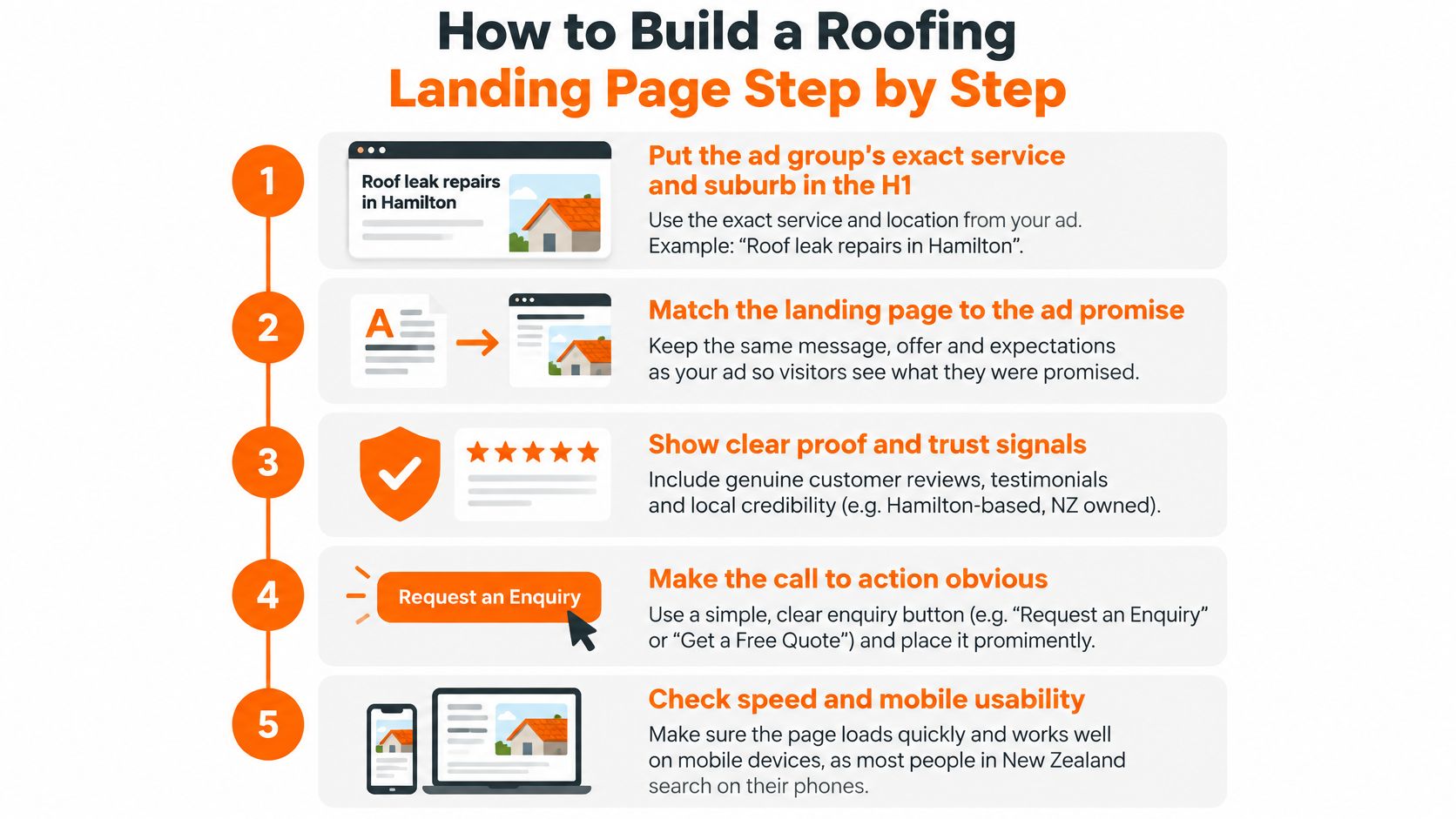
Build the offer before styling the page
-
Write the service and location into the H1. Use Roof leak repairs in Hamilton, then add the actual suburb coverage beneath it. In this example, you could offer inspections within 48 hours, but only if that’s a commitment your schedule supports.
-
Make calling the primary action. Put a tap-to-call button above the fold, meaning the area visible before scrolling. Add a quieter request-a-quote button for Hamilton homeowners who can’t call, rather than giving both buttons equal emphasis.
-
Put credible proof near the action. For this example, select five recent Hamilton jobs, with a compact preview near the top and the remaining photographs further down. Show your current Google star rating and review count, plus relevant licence and insurance details that you can substantiate.
-
State a response commitment you can keep. A hypothetical promise might be a callback within two hours on weekdays. Distinguish that callback from attending the Hamilton property, especially when weather or safe roof access could affect scheduling.
-
Use a leak-specific enquiry form. Ask where the Hamilton property is and what’s happening, rather than making the homeowner choose a replacement product. Let them submit without photographs if taking them would require unsafe access.
-
Remove competing exits. Strip out promotional menus and unrelated service links that distract from arranging leak assistance. Keep business contact details, privacy information and essential service conditions accessible.
-
Test the complete journey on mobile data. Open the Hamilton page on your own phone, tap the number and submit the form. Check that the call reaches the right person and that the enquiry notification contains enough information to arrange a visit.
Set a useful performance target
Activate’s commercial NZ conversion benchmark guide describes approximately 3–5% as a service-business landing-page baseline and 6–10% as strong. Treat those figures as directional, not an official roofing dataset or a promise about your campaign.
The finished phone screen should communicate service, suburb, proof and a button without squeezing in the entire sales pitch. Leave detailed project descriptions further down.
For a companion walkthrough of the build, use the video below.
Form Fields and Call Buttons That Get Enquiries
A homeowner with water coming through the ceiling needs a clear way to call. Someone planning a roof replacement may prefer to describe the job first. Give visitors separate paths: Need help now? with a prominent call button, and Planning a project? with a structured form. Judge both by qualified calls and booked inspections, not raw form fills.
Form fields for a roofing landing page
| Form field | Keep on first form? | Why it matters | Roofing example |
|---|---|---|---|
| Phone number | Yes, required | Lets you follow up about the job | Mobile format, tap-friendly |
| Suburb | Yes | Confirms you cover the job | Dropdown of the suburbs you serve |
| Roof issue | Yes, dropdown | Helps sort urgent repairs from planned work | Leak, full replacement, gutters, other |
| Roof material | Optional dropdown | Helps prepare for a repair or replacement discussion | Long-run iron, tile, membrane, not sure |
| Roof age | Optional | Gives useful context for repair or replacement enquiries | Under 15 years, 15–30, over 30 |
| Photos | Optional upload | Can help with an initial assessment | Photos of visible damage, if safe to take |
| Street address | No, ask after booking | Collect it once a visit is agreed | Confirm the property address by phone |
| Budget range | No | Discuss scope and costs during the conversation | Ask on the call if relevant |
Keep the first form short. Ask only for details that help decide whether to call, what to ask, or how to prepare for an inspection. Photos can assist with an initial assessment, but they may not reveal concealed damage or the condition of the substrate. Include “not sure” for roof material so a homeowner isn’t forced to guess.
Make each enquiry action clear
- Use one form per page. Point quote buttons to the same form so enquiries follow one route.
- Keep the call button visible. Show a tappable number before scrolling, especially for urgent leak enquiries.
- Explain what happens next. The confirmation message should say who will respond, how they’ll make contact and the response time you can meet.
- Keep other controls out of the way. Don’t place a chat panel or interactive map above the call button or form.
Remove fields that don’t help with the first conversation. For urgent jobs, make calling the quickest option; for planned work, use the form to collect just enough information to arrange a useful discussion or inspection.
Mobile Load Speed Targets for Roofing Pages
A roofing page can look polished on office Wi-Fi and still frustrate someone using mobile data outside a leaking house. Test the actual destination from your ad, including tracking redirects, rather than opening a stripped-down preview.
Set Largest Contentful Paint at or below 2.5 seconds as your technical acceptance target. That measures when the largest visible content element appears, not when every background script finishes. Mobile usability deserves deliberate testing in New Zealand’s established mobile environment, documented by Stats NZ’s mobile internet reporting; the target here is an implementation standard, not a threshold established by that historical report.
This mobile layout illustrates the priority: a recognisable service and an accessible enquiry action.
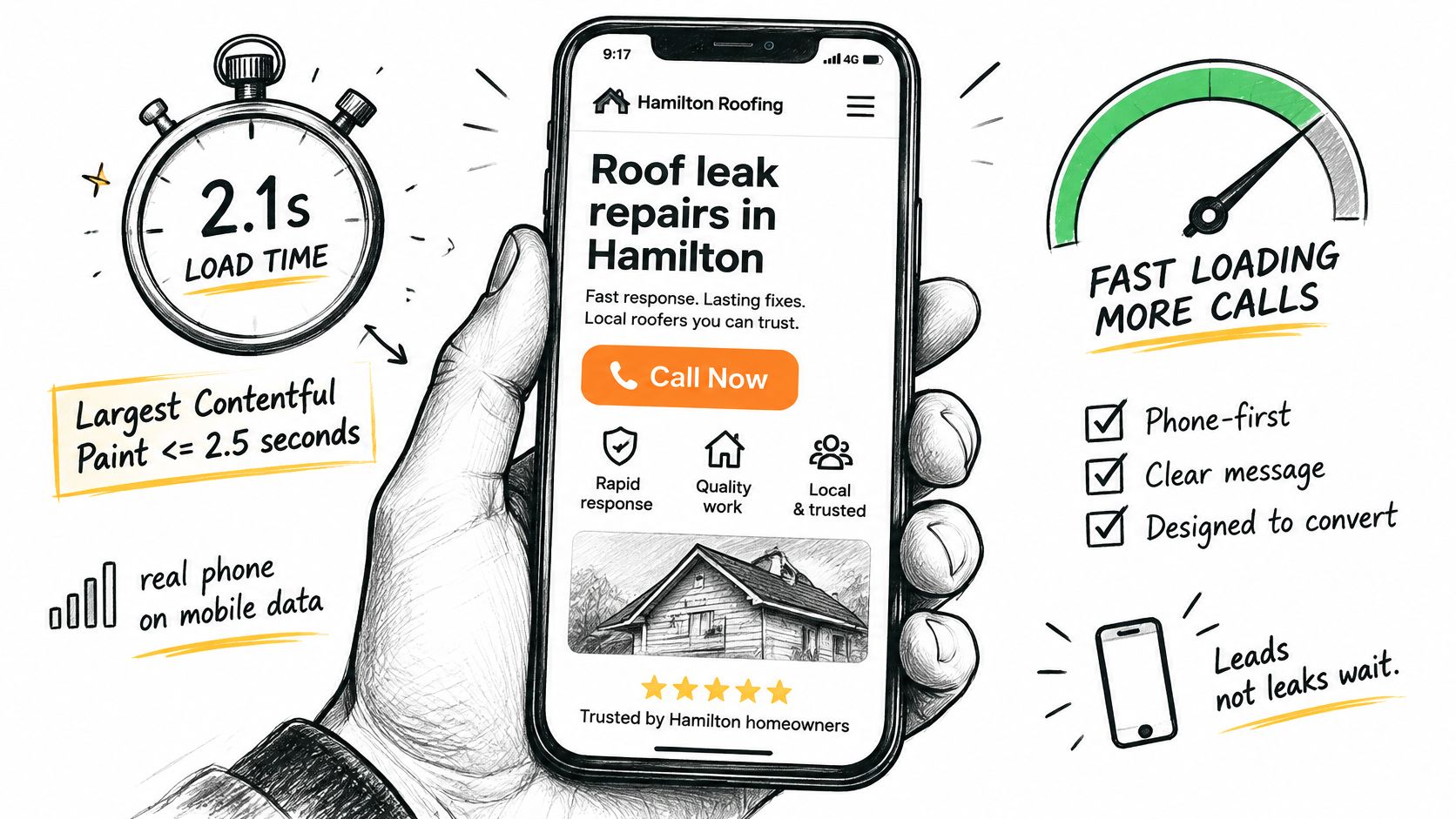
Audit what loads before the homeowner can act
- Follow the ad-to-page route. On mobile data, watch when the main roof image appears and when the buttons become usable. Use PageSpeed Insights alongside the physical phone check.
- Resize and compress photographs. Convert roof images to WebP or AVIF and serve appropriately sized versions for phone screens. Don’t deliver an original camera file to display a small before-and-after panel.
- Defer optional widgets. Load chat, maps and embedded review feeds after the main content and form.
- Review third-party tags. Retain necessary measurement and remove duplicate or unused scripts. Test tracking after changing anything.
- Cache the page and check calls. Enable server-side caching where appropriate and make phone numbers proper tap-to-call links.
A faster photograph is useful. A homeowner who can actually reach your team is the commercial outcome.
Compare mobile conversion results by device, campaign and suburb after each change. Use qualified calls and booked inspections to choose winners, and avoid changing the headline, form and imagery simultaneously.
This week, start with the heaviest image, defer the most intrusive widget, then repair any phone link that doesn’t open the dialler. Those are specific fixes you can verify without commissioning a redesign.
Tracking Calls and Forms Without Breaking Privacy Rules
Separate call conversions from completed-form conversions so you can see how homeowners prefer to enquire. Then connect those enquiries to qualified leads and booked inspections in your job sheet or CRM. A ringing phone isn’t proof that the campaign produced a suitable roofing job.
For the mechanics of number attribution, use this guide to call tracking software. Keep your business number and tracking configuration documented so changes don’t accidentally interrupt calls.
Connect the click to the job outcome
- Set an appropriate minimum call length. Use your phone logs to choose a threshold that filters obvious misdials. Duration is a screening tool, not proof of qualification.
- Track successful submissions. Trigger the form conversion after confirmed submission, typically on a thank-you page. Check that refreshing that page doesn’t create duplicate leads.
- Attach service and location information. Label tracking numbers or capture campaign details with forms so you can map outcomes to the relevant ad group.
- Update outcomes weekly. Mark enquiries as qualified, booked, quoted or won, and import suitable outcomes into Google Ads where possible. Avoid counting every stage as a separate new customer.
- Reconcile calls against your phone log. Compare a week of platform records with answered, missed and returned calls. Investigate discrepancies before trusting the report.
Disclose recording clearly
The New Zealand Privacy Commissioner says organisations recording customer conversations should tell customers they’re being recorded, and explains that people can request their personal information, including recordings, in a chosen format such as audio or a transcript. Put a clear recording notice at the start of recorded calls and maintain an access-request process.
Limit access to enquiry records and explain your information collection in an accessible privacy notice. Tracking a call and recording its audio are different functions, so don’t enable recording without considering how you’ll handle it.
A caller asking only what a tarp costs should be marked not qualified if you don’t sell tarps. That label separates a DIY product enquiry from a homeowner who needs your team to inspect and repair a leak.
Diagnosing a Weak Page and Checking It Before You Spend
Don’t assume more form submissions mean better marketing. A form that asks the right service question may attract fewer submissions while helping your team book more suitable inspections. Judge the change by cost per qualified lead, booked-inspection rate and booked-job rate, not the submission total alone.
Start with the symptom you can verify. These are likely causes to investigate, not automatic diagnoses.
Landing page symptoms, causes and first fixes
| Symptom | Likely cause | First fix |
|---|---|---|
| Clicks but almost no calls | Phone number hidden or below the fold | Put tap-to-call in the first screen |
| Calls but few booked visits | Ads attract price-shoppers or DIY searches | Add negatives and a service-type question to the form |
| Form starts but few finish | Too many fields or a slow form | Cut to five fields and retest load time |
| Low landing page experience on an ad group | Headline does not repeat the ad group’s service | Rewrite the H1 to match the service and suburb |
| Good traffic, weak mobile results | Heavy images or late-loading widgets | Compress images and defer scripts |
| Cost per call rising, call volume flat | Ads sending traffic to the homepage | Send each ad group to its matching page |
Check relevance and credibility separately
Landing page experience contributes to Google’s quality assessment. A relevant service-and-suburb headline can support a better experience and potentially lower click costs, but changing the wording alone doesn’t guarantee cheaper traffic. The page still needs useful content, transparent business details and working enquiry controls.
Check the substance of your proof too. Superior Home Improvement’s roofing review tips for Utah homeowners offers a useful homeowner perspective on evaluating contractor feedback. For an NZ roofing page, favour genuine reviews that describe relevant work rather than relying solely on a star graphic.
If the problem extends beyond the page, use our guide to Google Ads not getting leads to examine targeting, search terms and tracking before blaming the design.
Run a short pre-spend check
Set aside ten minutes on your own phone. Confirm these practical checks before increasing spend:
- Call access: The number is tappable without scrolling, and someone receives the test call.
- Visible evidence: Relevant proof appears in the opening screen without crowding out the action.
- Form effort: Aim for five fields or fewer initially, with optional project details added only where useful.
- Measurement: A test call and successful test form appear in the appropriate tracking records.
Choose the first fix that matches your most common symptom, then schedule a two-week review on a real phone and in your reporting. If enquiry volume is sparse, allow more time before declaring a winner.
Bluelight builds lead-ready landing pages designed to make homeowners call instead of clicking away. You retain control of your ad account, and we access it only with explicit permission and solely for campaign management.
Bluelight can build your roofing landing pages and connect calls and forms to measurable enquiry outcomes. Visit Bluelight to discuss a page for your priority service and location, with separate routes for urgent leak callers and homeowners planning a project.
Related service Google Ads for Roofers